Enterprise SaaS · ITWeb · Desktop4 min read

ServiceDesk Plus: A redesign that cuts agent navigation steps by 45%.

Role
Product Designer, UX Researcher
Timeline
3 months
Tools
Figma, FigJam, Maze
Type
Self-initiated · Enterprise SaaS
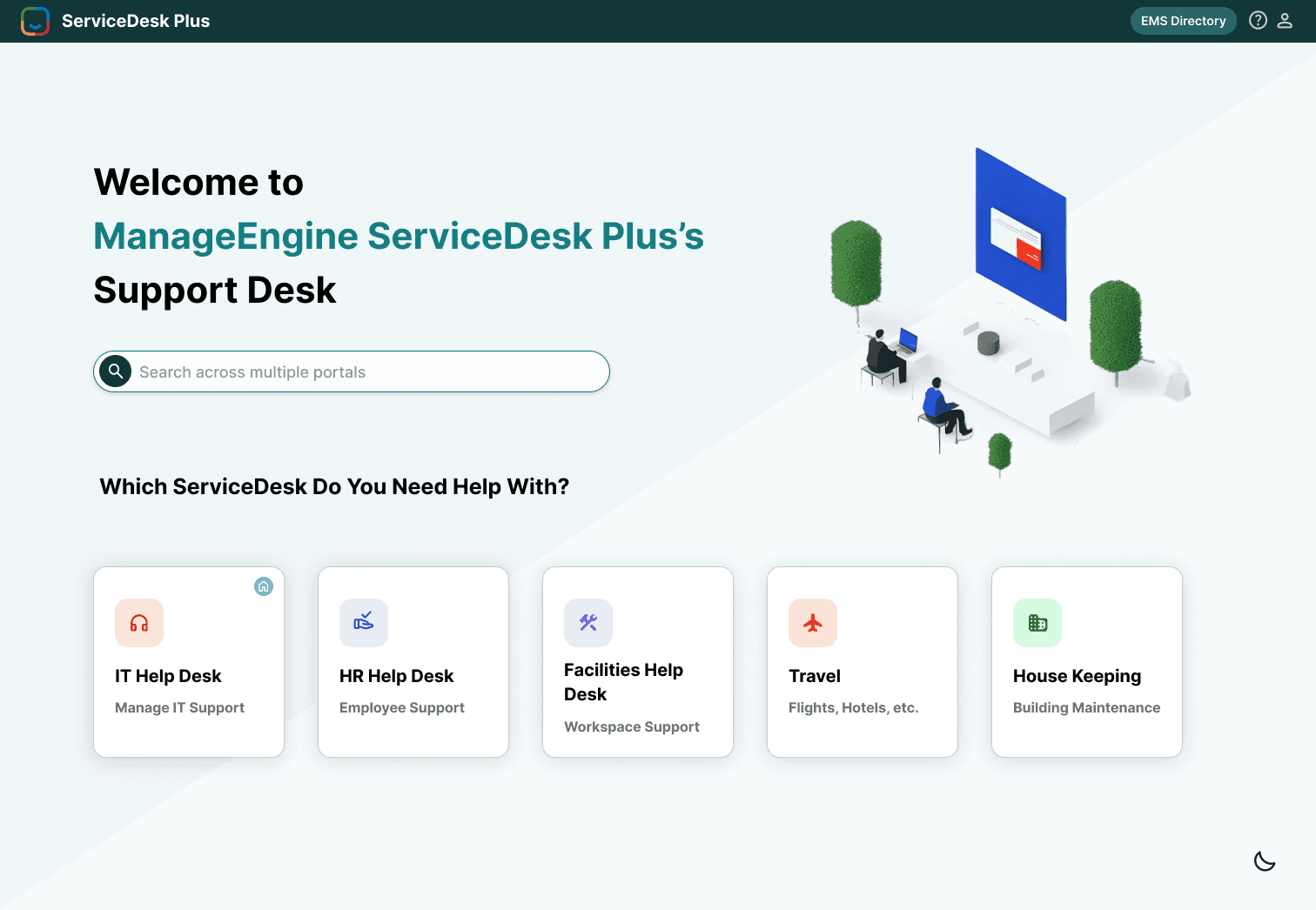
Redesigned ServiceDesk Plus self-service portal in light mode, with a search bar across portals and cards for IT, HR, Facilities, Travel and Housekeeping help desks

Project at a glance

Problem

ServiceDesk Plus is powerful but painful. IT agents waste time scanning cluttered queues, switching between disconnected modules, and hunting for information that should be one click away.

Solution

A redesign focused on information hierarchy, streamlined ticket workflows, and a dashboard that surfaces what matters — without adding or removing features.

Impact

An estimated 45% average reduction in navigation steps across five core agent workflows, from task-flow analysis of the original vs. redesigned interface.

Fewer navigation steps
45%
Steps to approve a CAB request
6 → 2
Faster access to priority tickets
75%

01 — The problem

Agents spend more time managing the tool than solving problems

ServiceDesk Plus serves IT teams of all sizes — ticketing, scheduling, and reporting. The functionality is there. The interface makes it hard to use.

  • Friction 01

    No workload at a glance

    Agents couldn’t scan what needed attention today.

  • Friction 02

    Disconnected screens

    Single tasks required jumping between multiple modules.

  • Friction 03

    Everything weighted equally

    Flat visual design made prioritising impossible.

Design question

How might we redesign ServiceDesk Plus so IT agents can triage, act on, and resolve tickets with fewer steps and less cognitive load — without disrupting the workflows they already know?

02 — UX audit

Where the interface fights its users

Before touching Figma, I used the live product and documented friction screen by screen.

  • Homepage

    No visual hierarchy

    Inconsistent iconography; every category looked equally important.

  • Ticket queue

    Dense, unfiltered table

    No priority signalling — agents had to mentally sort everything.

  • Calendar

    Identical events

    Deadlines and regular meetings were visually indistinguishable.

  • Dark mode

    Poor contrast

    Icons and cards blended into the background — harder to use, not easier.

Most critical finding

One common task — reviewing an urgent ticket, checking its status, and updating it — required navigating across three separate screens.

  1. Review ticket
  2. Check status
  3. Update ticket

03 — Competitive analysis & personas

Borrowing principles, not features

CriteriaServiceDesk PlusFreshserviceZendeskUX opportunity
Ticket priorityLong, unfiltered listsPriority tags + SLA highlightsSmart sorting + taggingVisual priority cues + SLA timers
Dashboard clarityDense, widget-heavyClean, modular summariesQuick-access overview panelsGroup key info, reduce clutter
NavigationFragmented, multi-screenStreamlined, fewer clicksIntuitive, cross-linkedReduce context switching
Data visibilityLimited, hard to act onBuilt-in analytics + trendsStrong manager dashboardsSurface actionable trends
Overall usabilityPowerful but overwhelmingModern, approachableOptimised for speedBalance depth with simplicity

The pattern

Both competitors win by reducing the number of decisions agents make. I didn’t need to match them feature-for-feature — just borrow the principle: surface priority, reduce scanning, consolidate views.

AK

Arjun

IT Support Agent · Tier 1 · 3 yrs on tool

“I have to open three different screens just to see what I’m supposed to be doing today.”

Goals

  • Know what’s urgent at a glance
  • Spend less time navigating, more time fixing

Frustrations

  • Opens four tabs every morning to start work
  • Queue treats every ticket as equal priority

Redesign needed to: One consolidated view — tickets, tasks, approvals — with priority visual and immediate.
MS

Meera

IT Operations Lead · 5 yrs in IT ops

“By the time I find the data I need, it’s too late to act on it.”

Goals

  • See team workload distribution
  • Catch SLA risks before they breach

Frustrations

  • Dashboards show raw numbers with no context
  • No way to filter team view by urgency

Redesign needed to: Dashboards that show trends, not counts — with SLA status and the team queue at a glance.

04 — Goals & iterations

Three iterations to the right home view

  1. 1

    Consolidate the agent view

    Approvals, tasks, and priority tickets on one screen. Zero tab-switching to start work.

  2. 2

    Make priority visual

    Colour-coded tags, SLA indicators, sorted queues — no thinking required.

  3. 3

    Improve without disrupting

    Actionable insights for managers, familiar enough that agents need no retraining.

  1. Option 1Discarded

    Clean welcome page with categorised entry points

    Clear, but too shallow for power users like Arjun. A welcome page adds a step instead of removing one.

  2. Option 2Partly kept

    Summary cards for approvals, requests & problems

    Agents could scan workload instantly — but cramming announcements and reminders in made it cluttered again.

  3. Option 3Chosen

    Split view: summary cards + “Review Your Work”

    Cards give the queue at a glance; the section below consolidates tasks, reminders, and announcements.

05 — Design decisions

Every decision traces back to a user problem

  1. D01

    Home page

    Problem
    Inconsistent icons and no hierarchy made categories look identical.
    Decision
    Consistent iconography, more spacing, clear labels, and a persistent search bar to skip navigation entirely.
    Why it matters
    Users recognise where to go instead of reading every label.
  2. D02

    IT Help Desk — My View

    Problem
    CAB approvals, requests, and tasks lived in three different modules.
    Decision
    A consolidated summary of approvals, open requests, and problems on top; “Review Your Work” below.
    Why it matters
    The agent’s whole day in one place — the biggest source of saved steps.
  3. D03

    Ticket / requests page

    Problem
    Every ticket looked the same regardless of urgency.
    Decision
    Colour-coded Critical / High / Medium / Low tags, better column spacing, and SLA deadline indicators.
    Why it matters
    High-priority tickets surface to the top of the mental scan.
  4. D04

    Calendar & dark mode

    Problem
    Identical calendar events, and a low-contrast dark mode that was harder to use.
    Decision
    Colour-coded event types with priority labels; dark mode rebuilt on #1A1A2E with high-contrast text and bright status accents.
    Why it matters
    Scannable schedules and a dark mode that meets WCAG AA contrast throughout.
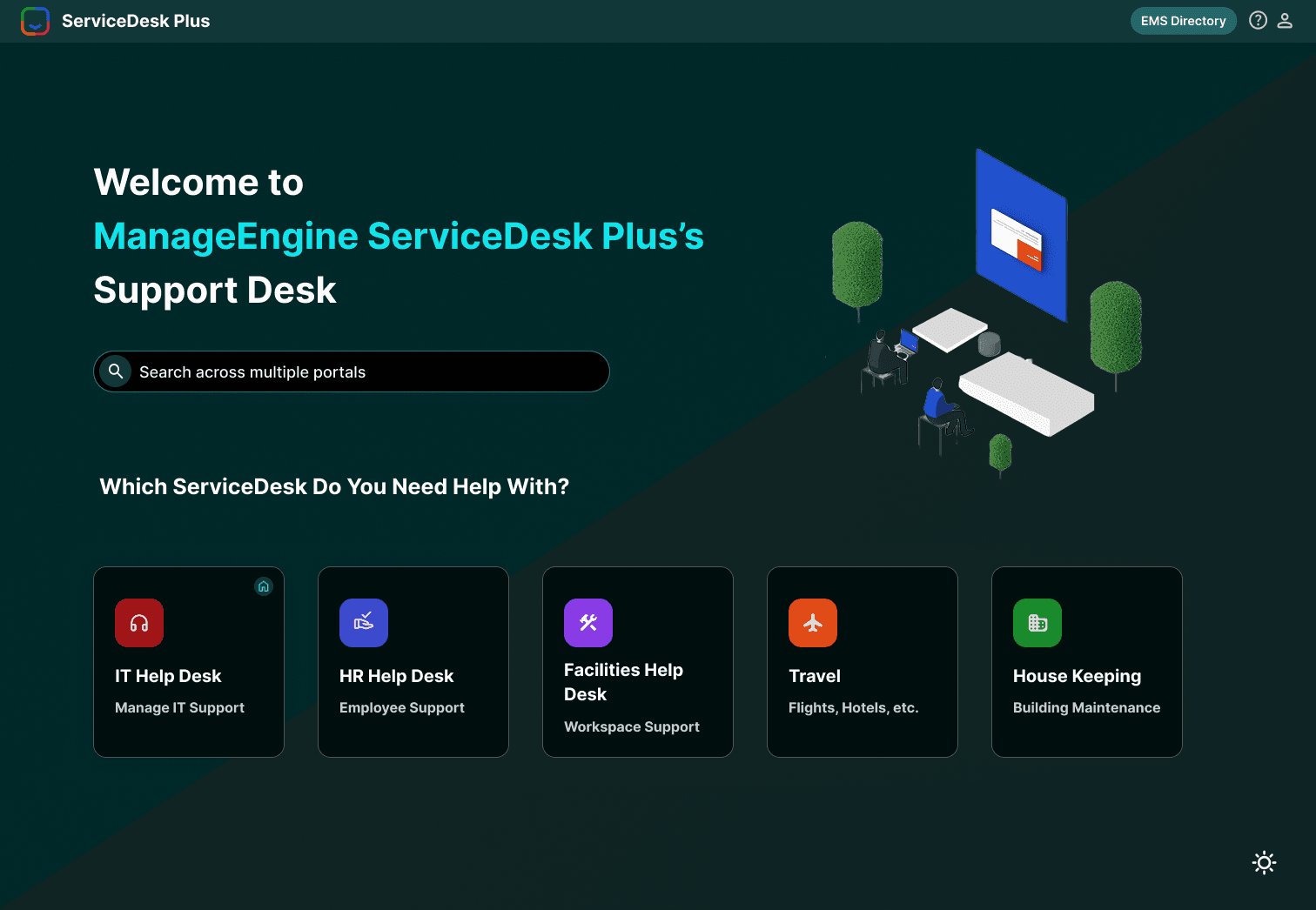
The ServiceDesk Plus self-service portal in the rebuilt dark mode, with colour-coded help desk cards
The rebuilt dark mode, with colour-coded help desks.

06 — Impact

Where the 45% comes from

TaskBeforeAfterSaved
View today’s priority tickets4175%
Find and approve a CAB request6267%
Check SLA status on a ticket5260%
Review team workload (manager)7357%
Update and close a ticket4325%

Method, stated honestly

Without a formal usability test (a constraint of this self-initiated project), I measured impact through task-flow analysis — counting navigation steps for the five most common agent tasks in the original and redesigned interfaces. Average reduction: 45%.

07 — Reflection

The constraint that sharpened the thinking

The hardest constraint wasn’t visual — it was preservation. I couldn’t remove features. IT teams have deep muscle memory, and a redesign that moves things too aggressively creates retraining costs that kill adoption.

Key takeaway

How much can you improve a tool while keeping everything roughly in place? Quite a lot. Most of the gains came from visual hierarchy and consolidation — not from restructuring the information architecture.

  • Next: moderated usability testing with working agents to validate time-on-task.
  • Next: measure manager adoption of trend-based dashboards vs. raw counts.

Self-initiated concept project. No affiliation with ManageEngine or ServiceDesk Plus.