ServiceDesk Plus is an IT helpdesk platform used by organizations to manage support requests and technical issues. I aimed to solve challenges in the existing interface, such as cluttered layouts, confusing navigation, and a lack of clarity by enhancing usability, readability, and overall user experience.
Timeline
January - May 2024
Responsibilities
User Research, Interaction Design, Visual design, Prototyping
Deliverables
Interactive Figma High-Fidelity Prototypes
Project Type
Individual Project
Timeline
3 Months
Responsibilities
User Research, Interaction Design, Visual design, Prototyping
ServiceDesk Plus is an IT helpdesk platform used by organizations to manage support requests and technical issues. While the tool is powerful, I noticed that its interface often feels cluttered, confusing, and difficult to navigate.
Seeing an opportunity to improve usability and clarity, I took the initiative to redesign ServiceDesk Plus. This was a self-initiated project where I applied my skills in interaction design, visual design, and prototyping to create a more intuitive and modern experience.
Research
UX Audit
Why I did it: To evaluate the existing ServiceDesk Plus interface and pinpoint where IT staff experienced friction.
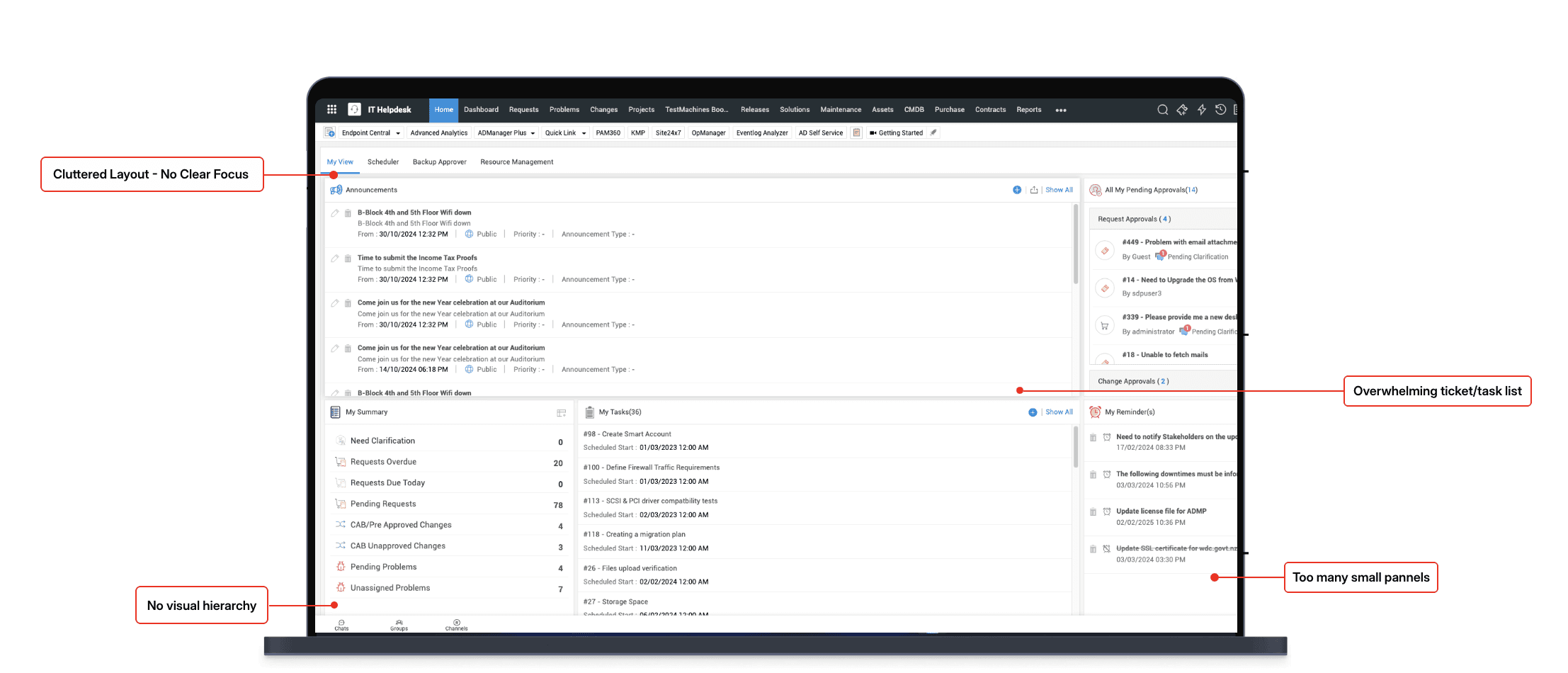
What I found out: While the platform offered robust functionality, it suffered from cluttered layouts, inconsistent navigation, and overwhelming ticket lists. Agents often spent unnecessary time scanning through unfiltered queues and switching between multiple views.
How it influenced my next move: This confirmed that the redesign needed to focus on clarity, hierarchy, and streamlined workflows tailored to IT staff efficiency.
UX Audit
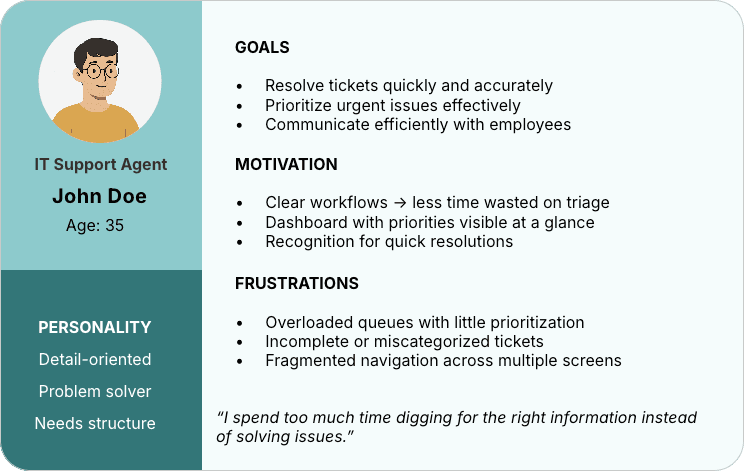
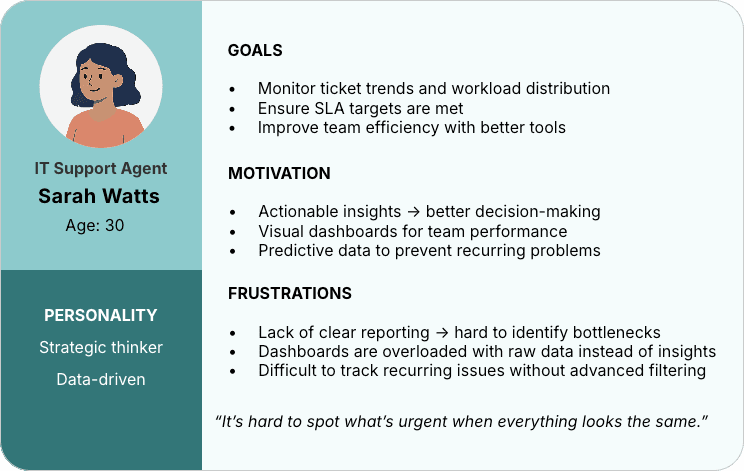
Personas:
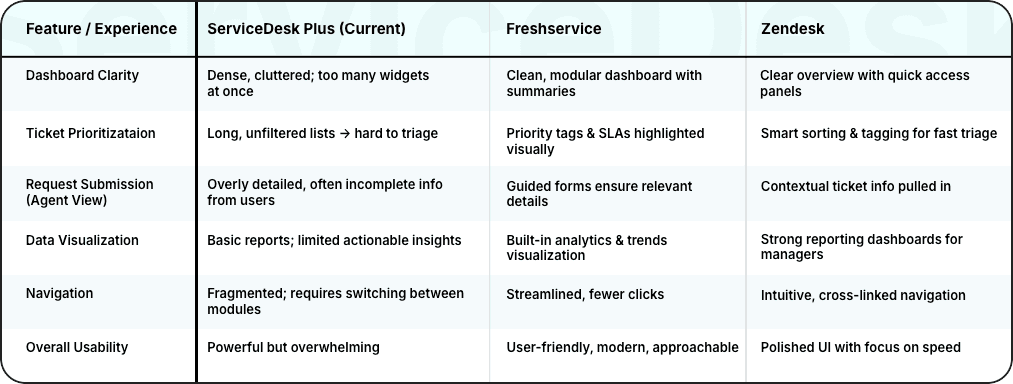
Competitive Analysis
Why I did it: To benchmark ServiceDesk Plus against other IT helpdesk tools and understand how they simplified complex workflows.
What I found out: Competitors like Freshservice and Zendesk emphasized clean dashboards, priority-based ticketing, and actionable data visualization. These tools made it easier for agents to prioritize and resolve issues quickly.
How it influenced my next move:Inspired by these patterns, I decided to introduce visual dashboards, simplified ticket views, and clearer prioritization mechanisms into my redesign.
Ticket Prioritizataion
Priority tags & SLAs highlighted
visually
Long, unfiltered lists → hard to triage
Smart sorting & tagging for fast triage
Data Visualization
Built-in analytics & trends visualization
Basic reports; limited actionable insights
Strong reporting dashboards for managers
Overall Usability
Powerful but overwhelming
User-friendly, modern, approachable
Polished UI with focus on speed
Request Submission
(Agent View)
Overly detailed, often incomplete info from users
Guided forms ensure relevant details
Contextual ticket info pulled in
Navigation
Fragmented; requires switching between modules
Streamlined, fewer clicks
Intuitive, cross-linked navigation
Dashboard Clarity
Dense, cluttered; too many widgets at once
Clean, modular dashboard with
summaries
Clear overview with quick access panels
Feature / Experience
ServiceDesk Plus (Current)
Freshservice
Zendesk
Personas:
PERSONALITY
Detail-oriented
Problem solver
Needs structure
IT Support Agent
John Doe
Age: 35
GOALS
Resolve tickets quickly and accurately
Prioritize urgent issues effectively
Communicate efficiently with employees
MOTIVATION
Clear workflows → less time wasted on triage
Dashboard with priorities visible at a glance
Recognition for quick resolutions
FRUSTRATIONS
Overloaded queues with little prioritization
Incomplete or miscategorized tickets
Fragmented navigation across multiple screens
“I spend too much time digging for the right information instead
of solving issues.”
PERSONALITY
Strategic thinker
Data-driven
IT Support Agent
Sarah Watts
Age: 30
GOALS
Monitor ticket trends and workload distribution
Ensure SLA targets are met
Improve team efficiency with better tools
MOTIVATION
Actionable insights → better decision-making
Visual dashboards for team performance
Predictive data to prevent recurring problems
FRUSTRATIONS
Lack of clear reporting → hard to identify bottlenecks
Dashboards are overloaded with raw data instead of insights
Difficult to track recurring issues without advanced filtering
“It’s hard to spot what’s urgent when everything looks the same.”
Before redesigning ServiceDesk Plus, I made a few key assumptions to guide initial concepts and priorities:
IT support staff are the primary users of the helpdesk dashboard, rather than employees submitting tickets.
Agents prefer a clear and efficient interface that reduces clutter and highlights priorities.
A consistent visual hierarchy and simplified layouts will improve task management and reduce errors.
Most IT staff will access the platform on desktop devices during working hours.
Constraints
While redesigning ServiceDesk Plus, I also considered a few constraints that shaped what was possible:
Feature Preservation: Core ServiceDesk Plus functionality (Requests, CAB Approvals, Announcements, Problems) had to remain intact; the redesign focused on usability, not feature removal.
Time & Scope: The project prioritized key dashboards and homepage screens, rather than a full end-to-end redesign of every module.
Adoption Feasibility: The solution had to feel familiar enough to current users to reduce retraining needs, balancing innovation with practicality.
Desktop-First Focus: The design was optimized for desktop use, acknowledging that mobile optimization could be explored as a future phase.
Design Goals
Design Goals
Simplify the Experience
Simplify the Experience
Reduce dashboard clutter and make the most important information easy to scan at a glance.
Reduce dashboard clutter and make the most important information easy to scan at a glance.
Clarify Priorities
Clarify Priorities
Ensure IT staff can quickly identify urgent requests, overdue tasks, and high-priority issues.
Ensure IT staff can quickly identify urgent requests, overdue tasks, and high-priority issues.
Streamline Workflows
Streamline Workflows
Group related elements (tasks, reminders, announcements) to reduce context switching and improve efficiency.
Group related elements (tasks, reminders, announcements) to reduce context switching and improve efficiency.
Modernize the Interface
Modernize the Interface
Apply consistent icons, balanced whitespace, and updated visuals to create a more approachable, professional feel.
Apply consistent icons, balanced whitespace, and updated visuals to create a more approachable, professional feel.
🧩 Assumptions
Applied Designs
✏️ Paper Wireframes
Wireframes
Wireframes
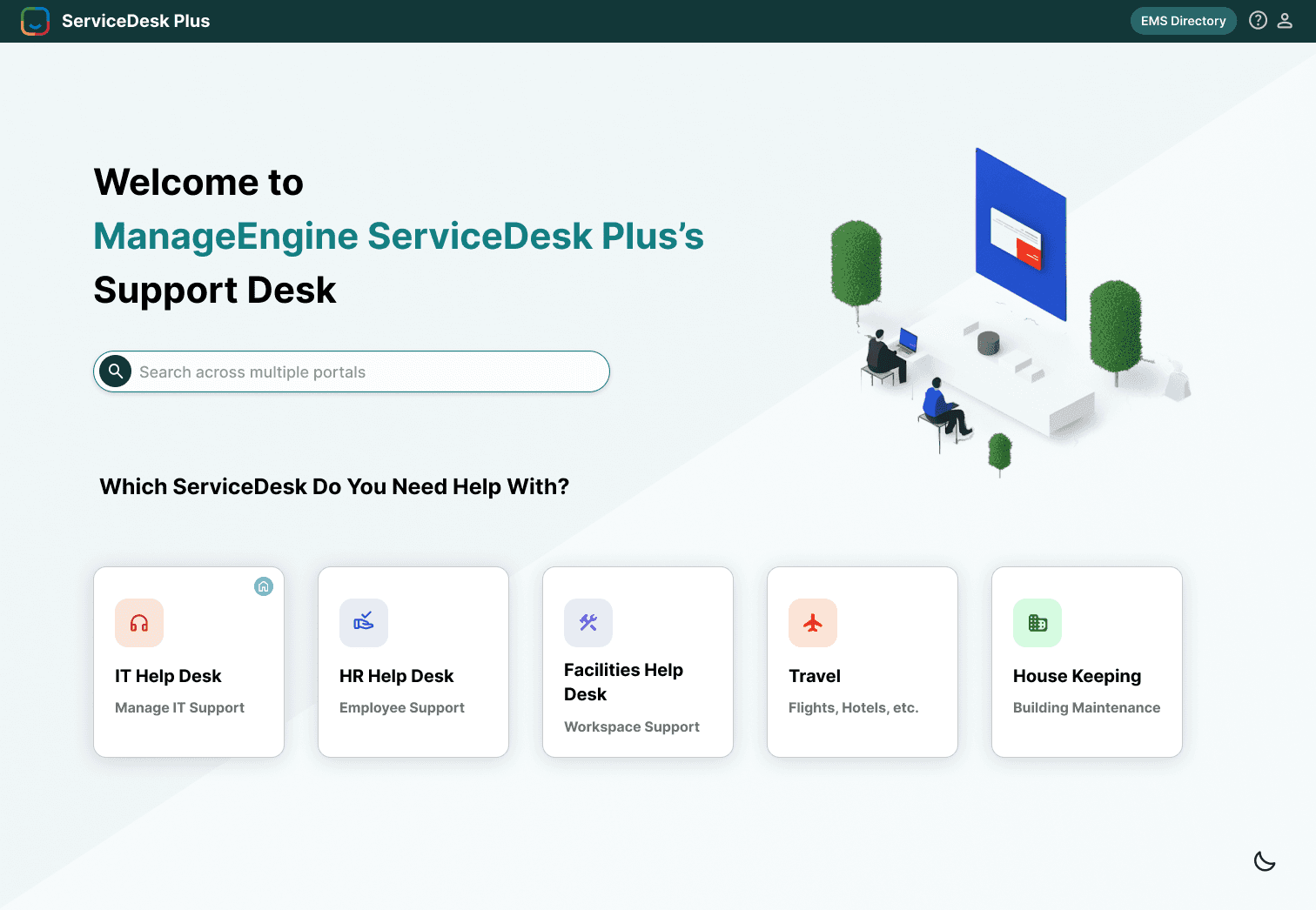
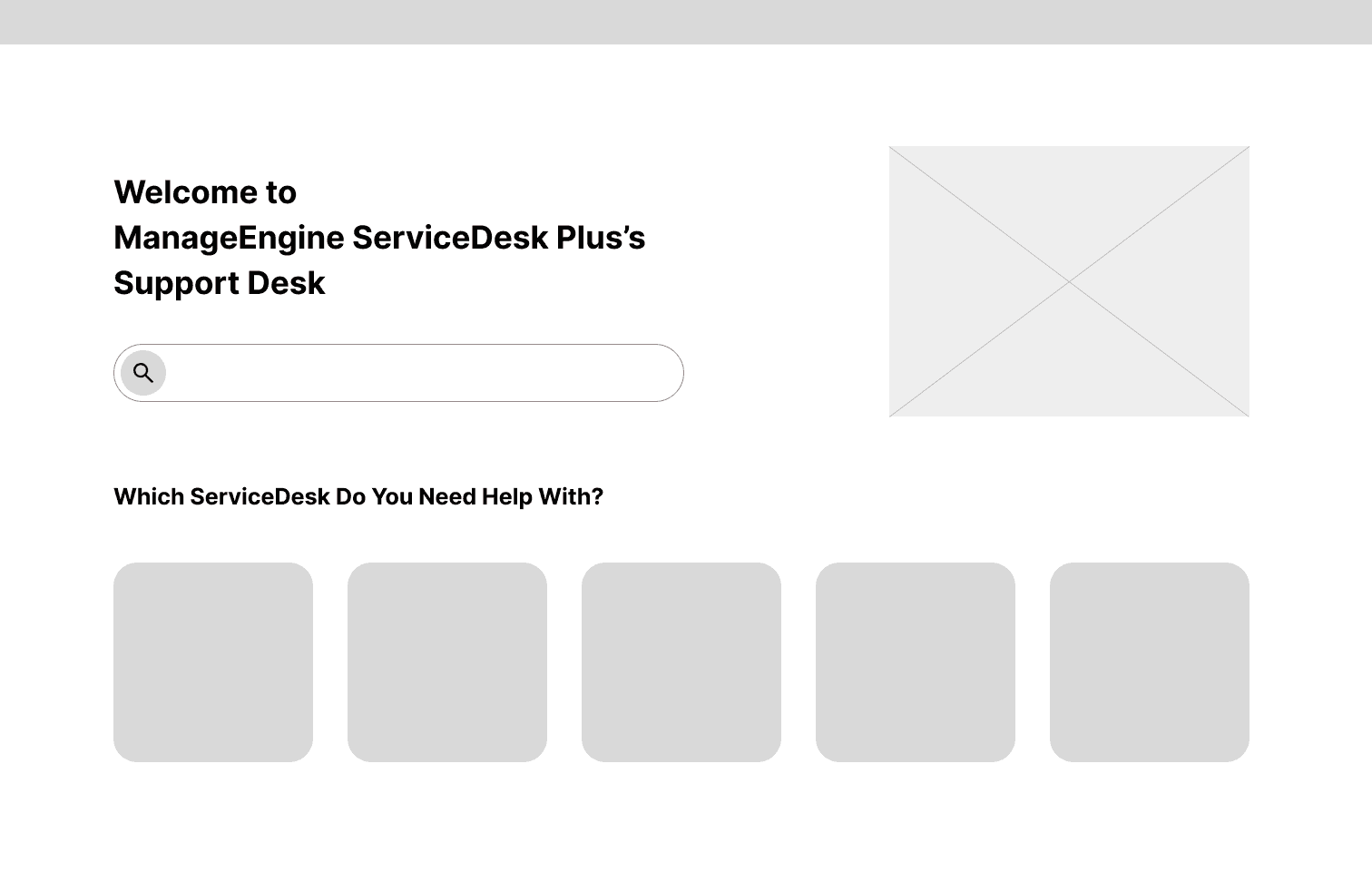
Explored a simplified entry point with a clean welcome page. The goal was to make it easier for staff to quickly identify where to go without overwhelming them with too many options.
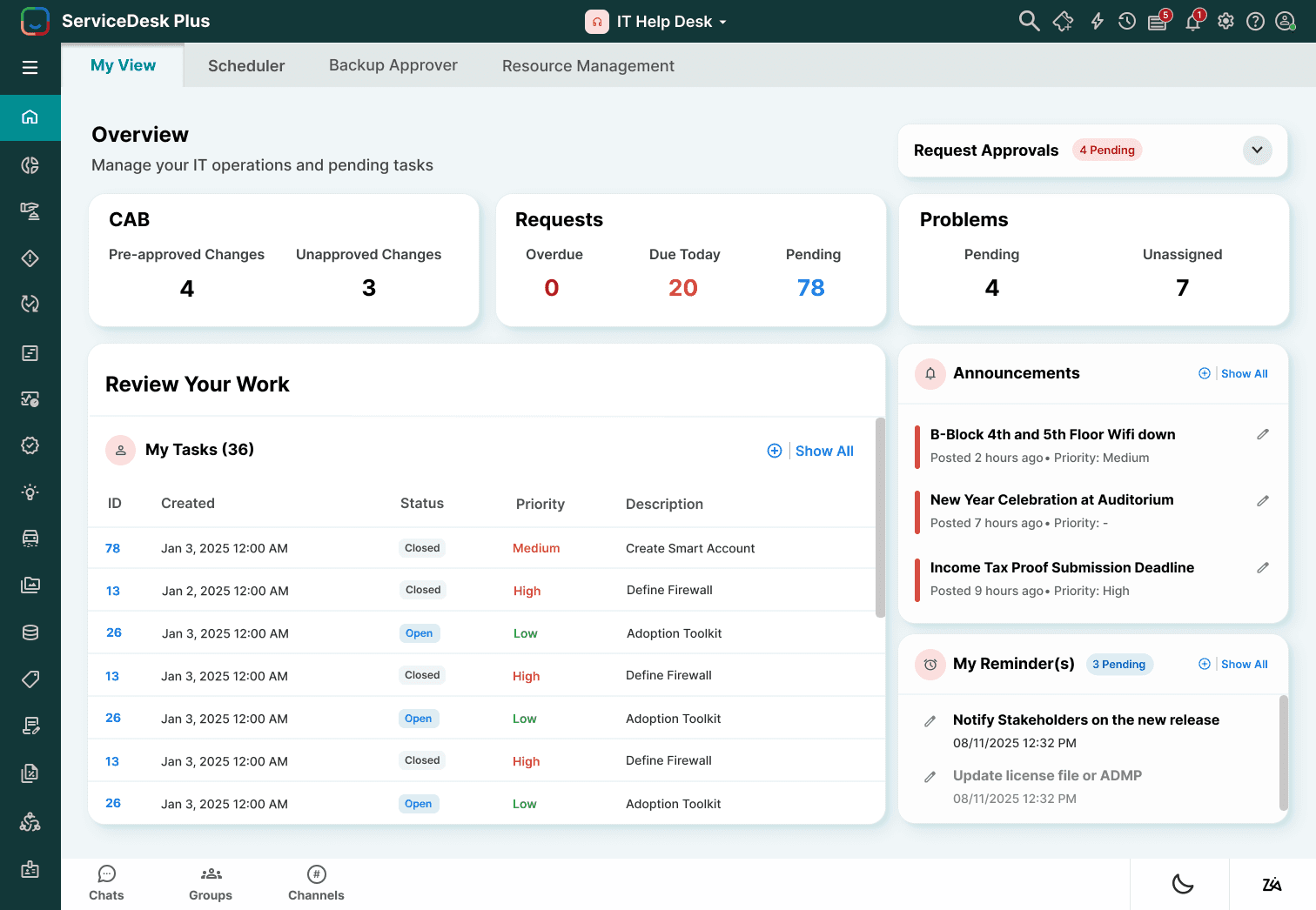
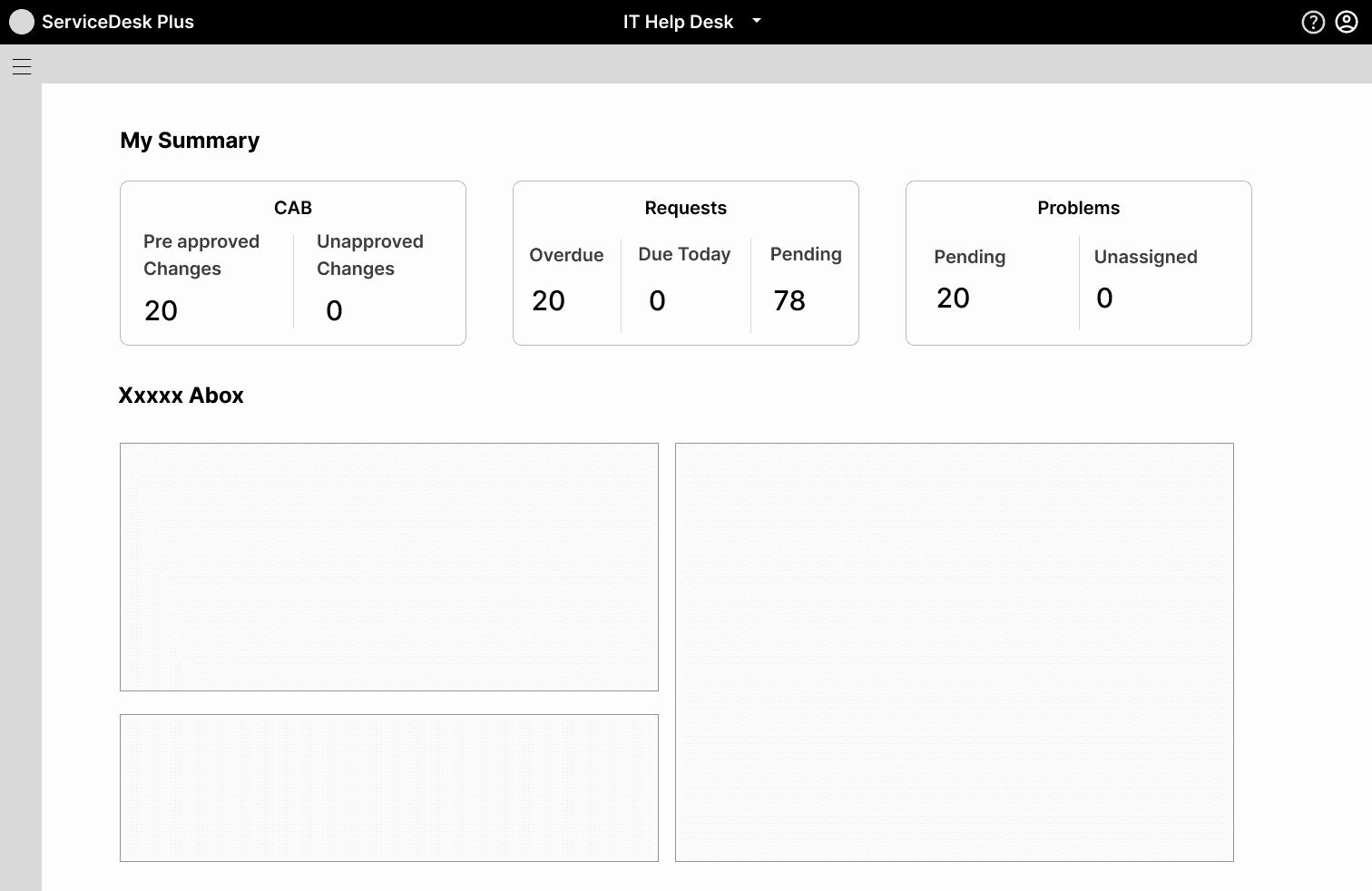
Tested grouping of CAB approvals, Requests, and Problems into summary cards. This provided agents with a quick overview of their workload but still left open questions about where to place announcements and tasks.
This iteration prioritized daily visibility, ensuring agents could focus on tasks and reminders while still having context from the overall system.
Explored a simplified entry point with a clean welcome page. The goal was to make it easier for staff to quickly identify where to go without overwhelming them with too many options.
Tested grouping of CAB approvals, Requests, and Problems into summary cards. This provided agents with a quick overview of their workload but still left open questions about where to place announcements and tasks.
This iteration prioritized daily visibility, ensuring agents could focus on tasks and reminders while still having context from the overall system.
✏️ Paper Wireframes
Explored a simplified entry point with a clean welcome page. The goal was to make it easier for staff to quickly identify where to go without overwhelming them with too many options.
Tested grouping of CAB approvals, Requests, and Problems into summary cards. This provided agents with a quick overview of their workload but still left open questions about where to place announcements and tasks.
This iteration prioritized daily visibility, ensuring agents could focus on tasks and reminders while still having context from the overall system.
Applied Designs
Applied Designs
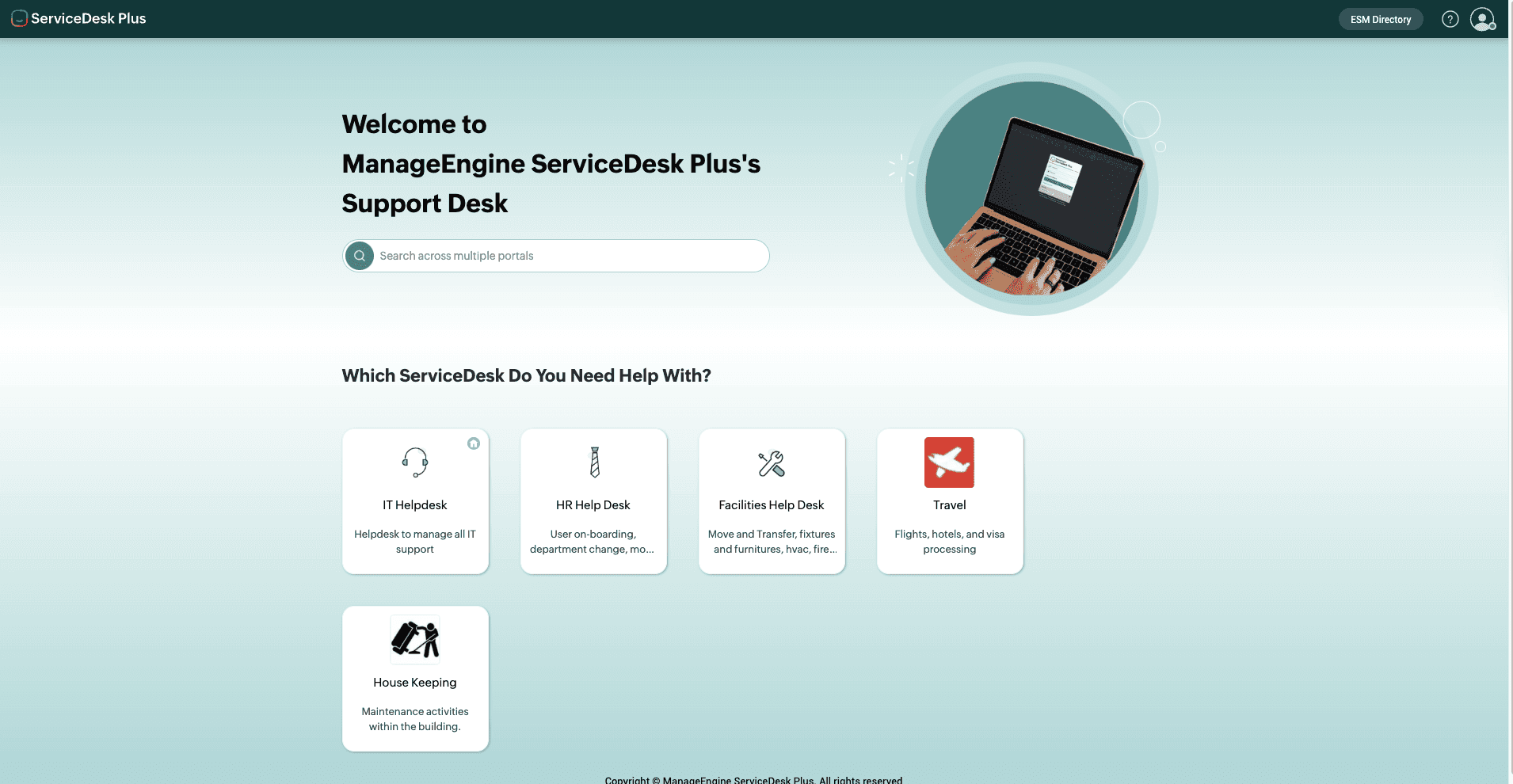
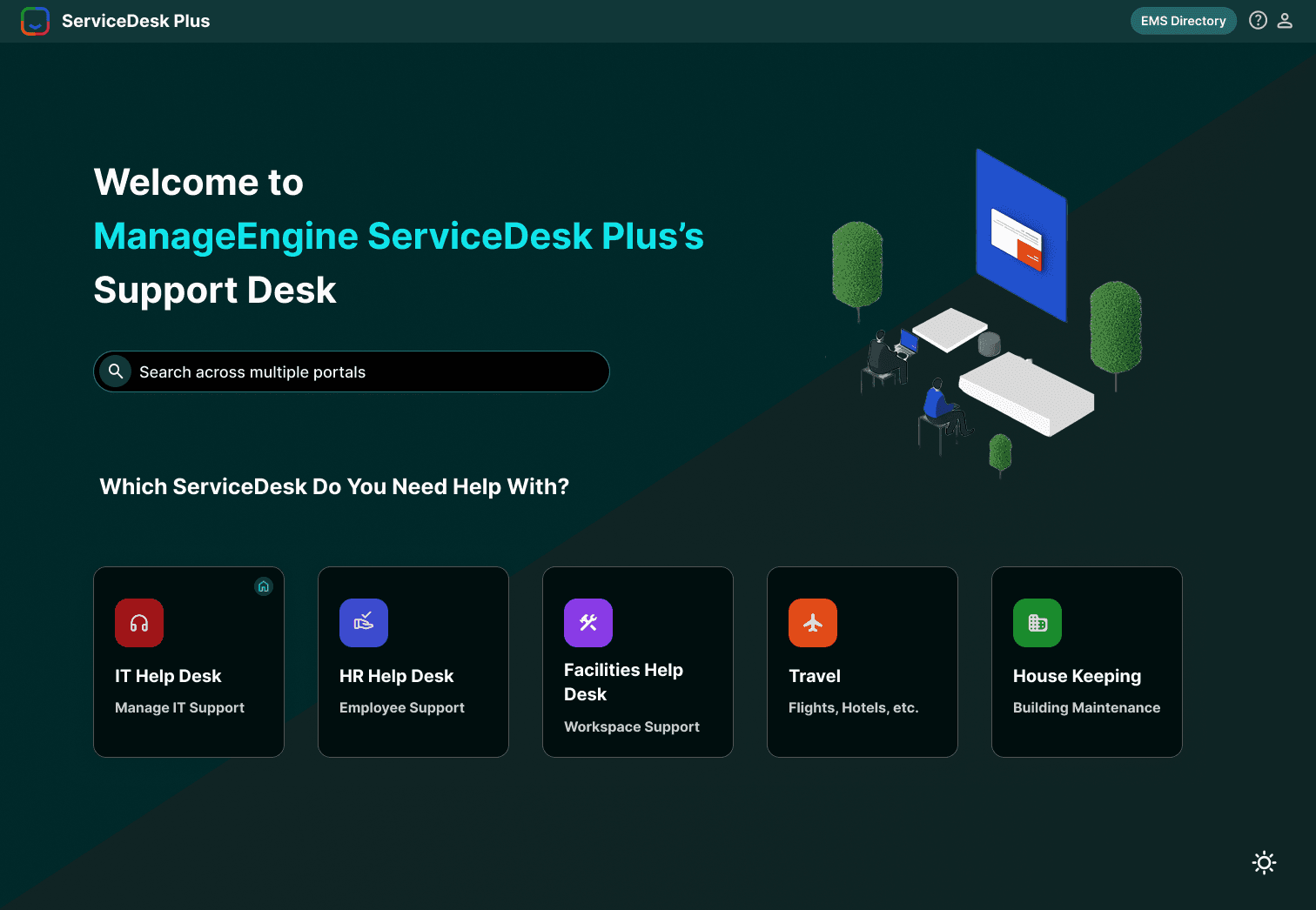
Home Page:
Issues - Existing Design
ⅹ Inconsistent icons reduced visual clarity.
ⅹ The large unused space made the layout inefficient.
ⅹ Categories were not visually distinct, slowing navigation.
Redesign Decisions
✔ Applied consistent iconography across categories.
✔ Balanced whitespace for a cleaner, more efficient layout.
✔ Introduced modern cards for clear, scannable categories.
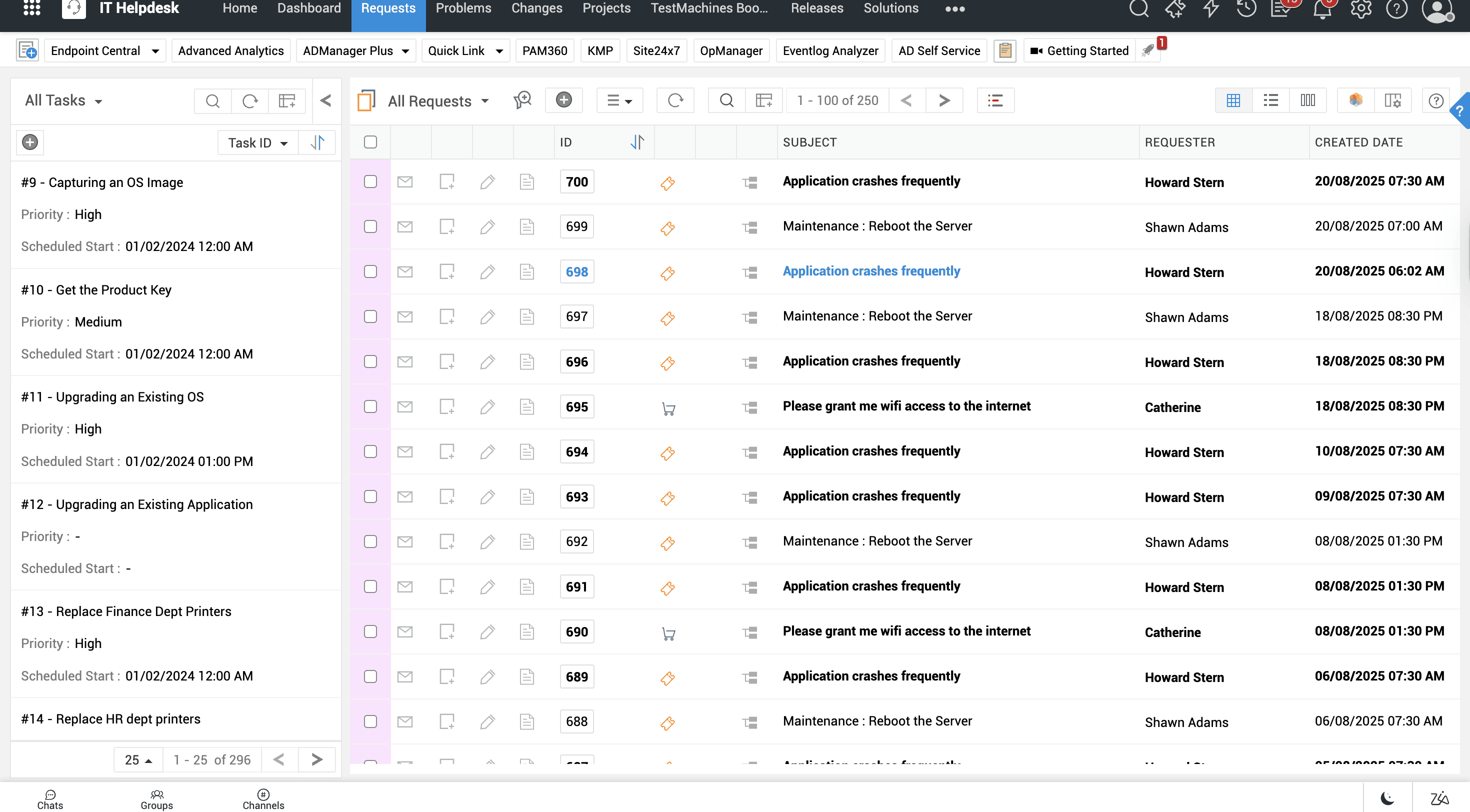
Tickets page:
Issues - Existing Design
ⅹ Dense tables with overwhelming text.
ⅹ Poor alignment and spacing reduced readability.
ⅹ Lack of hierarchy made it hard to prioritize tasks.
Redesign Decisions
✔ Simplified table design with consistent spacing.
✔ Applied visual hierarchy through column alignment and labels.
✔ Highlighted status/priority with color coding for quick decisions.
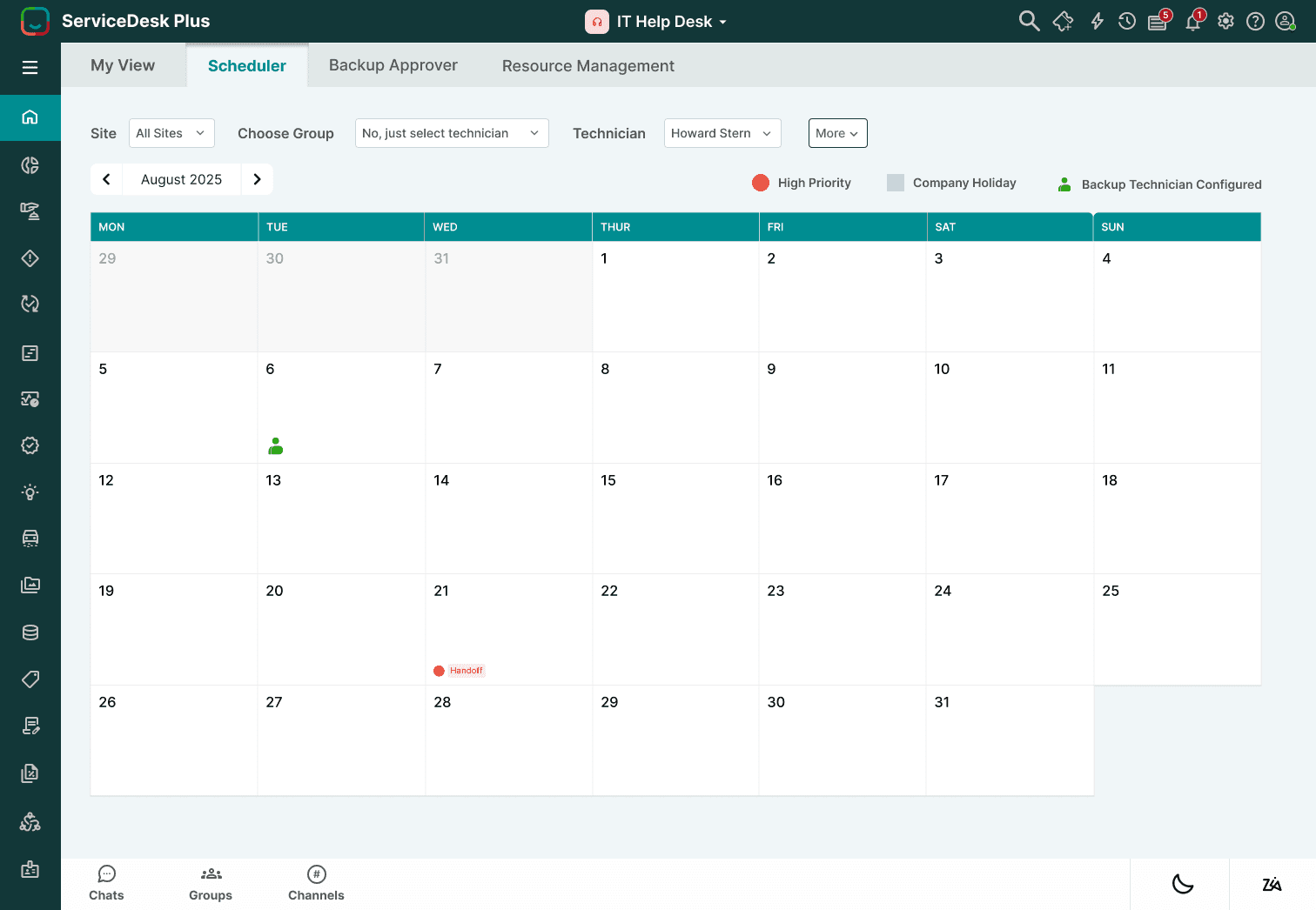
3. Calendar Page:
Issues - Existing Design
ⅹ Minimal styling made events difficult to distinguish.
ⅹ Poor hierarchy led to difficulty in scanning busy schedules.
ⅹ Lacked visual cues for priorities or deadlines.
Redesign Decisions
✔ Color-coded events to highlight status and priority.
✔ Improved layout with stronger grid and spacing.
✔ Clearer labels and hierarchy for faster scanning.
Dark Mode:
Issues (Existing Design)
Inconsistent icons reduced visual clarity.
The large unused space made the layout inefficient.
Categories were not visually distinct, slowing navigation.
Redesign Decisions
Applied consistent iconography across categories.
Balanced whitespace for a cleaner, more efficient layout.
Introduced modern cards for clear, scannable categories.
Before
After
Before
Home Screen
Issues (Existing Design)
• Minimal styling made events difficult to distinguish.
• Poor hierarchy led to difficulty in scanning busy schedules.
• Lacked visual cues for priorities or deadlines.
Before
After
Before
Redesign Decisions
• Color-coded events to highlight status and priority.
• Improved layout with stronger grid and spacing.
• Clearer labels and hierarchy for faster scanning.
Calendar/Scheduler
Issues (Existing Design)
Dense tables with overwhelming text.
Poor alignment and spacing reduced readability.
Lack of hierarchy made it hard to prioritize tasks.
Before
After
Before
Redesign Decisions
Simplified table design with consistent spacing.
Applied visual hierarchy through column alignment and labels.
Highlighted status/priority with color coding for quick decisions.
Request Page
Issues (Existing Design)
Colors lacked contrast, reducing readability.
Icons and cards blended into the background.
The overall feel was dull and not visually engaging.
Before
After
Before
Redesign Decisions
Improved contrast with a richer dark background.
Bright accent colors for icons and categories.
Modern, accessible dark mode that feels polished and professional.
Dark Mode
Issues - Existing Design
ⅹ Colors lacked contrast, reducing readability.
ⅹ Icons and cards blended into the background.
ⅹ The overall feel was dull and not visually engaging.
Redesign Decisions
✔ Improved contrast with a richer dark background.
✔ Bright accent colors for icons and categories.
✔ Modern, accessible dark mode that feels polished.
This is the homepage where users can see all the ServiceDesk categories clearly laid out, including IT Help Desk, HR Help Desk, Facilities Help Desk, Travel, and Housekeeping. A search bar is available at the top for quick access across portals, and the clean layout with consistent icons makes it easy to navigate.
IT Help Desk (My View)
This is the IT Help Desk ‘My View’ screen, where agents can see a summary of CAB approvals, requests, and problems at a glance. Below that, the ‘Review Your Work’ section highlights tasks, announcements, and reminders, bringing everything the agent needs for the day into one place.
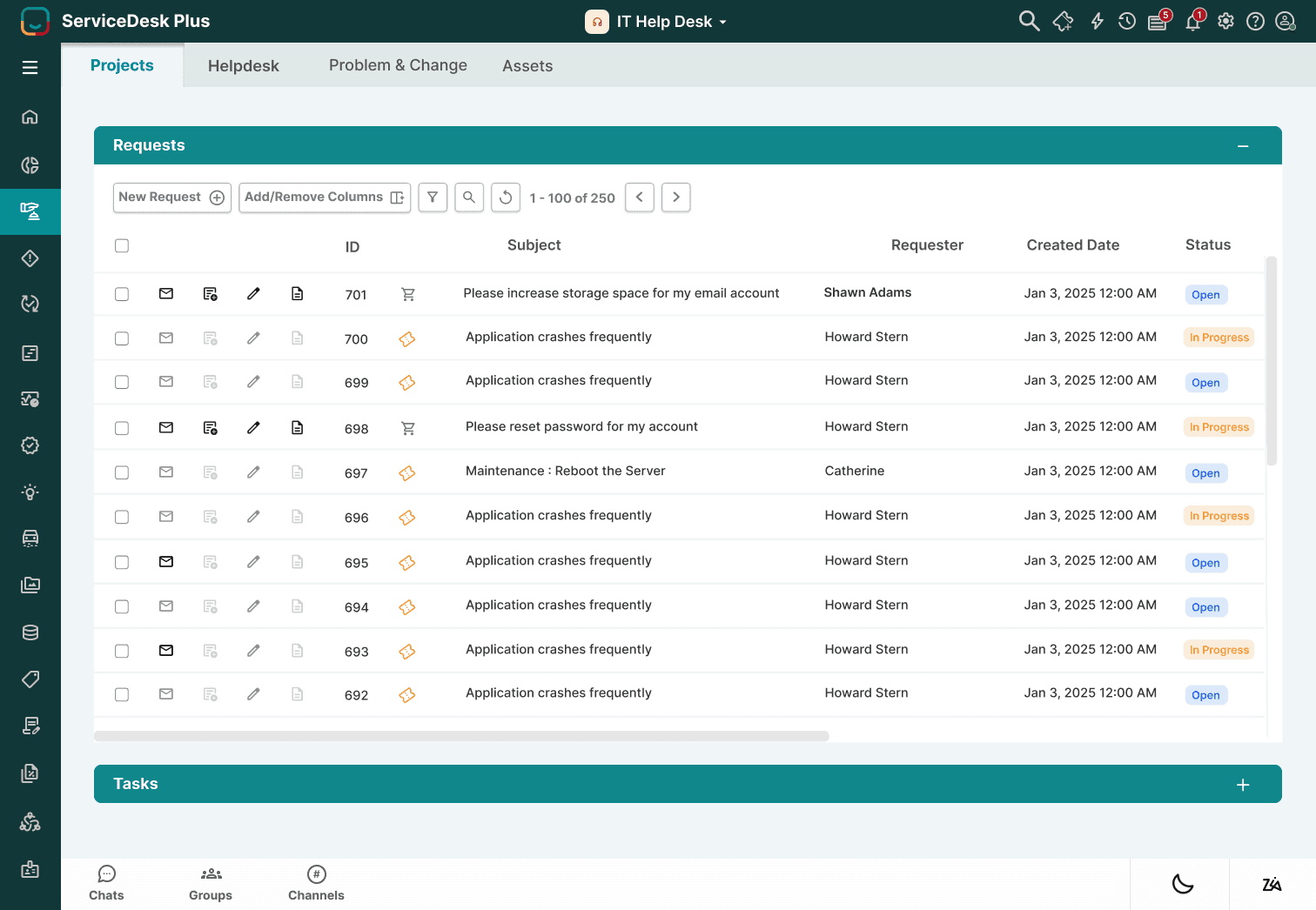
Dashboard & Requests
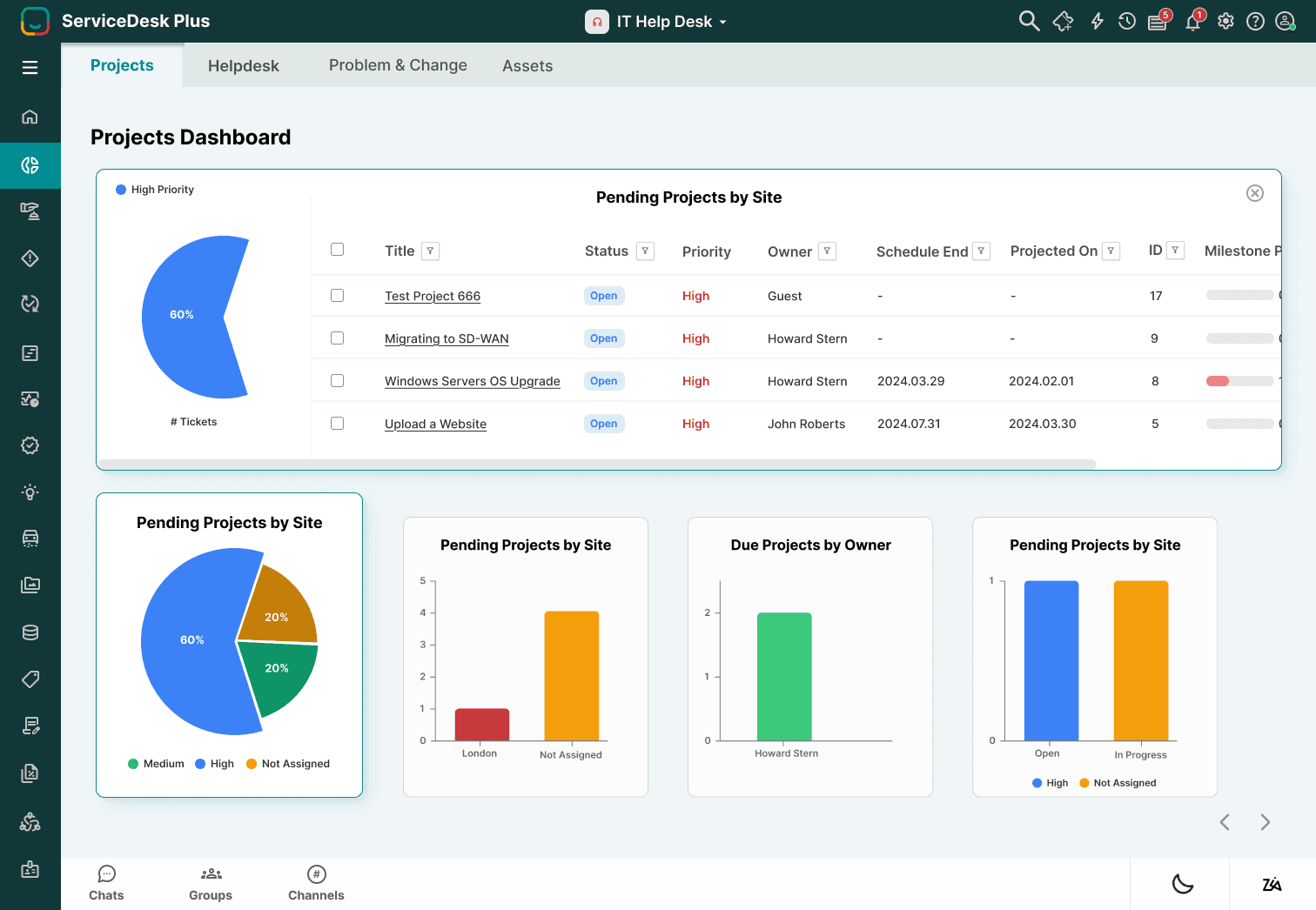
This is the Dashboard view, where users can see visual insights into pending projects, overdue tasks, and workload distribution through charts. The Requests section lists detailed tickets with their status, priority, and assigned owner, allowing IT staff to track and manage issues more effectively.
Dark Mode
This is the Dark Mode version of the redesigned interface. The homepage, dashboard, and IT Help Desk views are all adapted into a darker color scheme, reducing eye strain and offering users more flexibility depending on their work environment.
Reflection
If I had more time…
If I had more time, I would:
Conduct usability testing with real IT staff to validate my redesign decisions.
Explore mobile-first adaptations, since this version was designed primarily for desktop use.
My Learnings
I learned how clutter and poor hierarchy can overwhelm users, and how reorganizing layouts with clear grouping and whitespace can make complex tools more usable.
I realized the importance of focusing on user empathy — even without formal research, considering IT staff roles (agents and managers) guided my design choices.
I strengthened my ability to balance functionality with simplicity, ensuring key features remained while reducing visual noise.
Although I did not conduct full usability testing, I asked a developer’s opinion during the design process. Their perspective helped me refine the screens to ensure the redesign was not only visually clean but also technically practical.